Microsoft Outlook Integration - Admin Configuration
Microsoft Outlook 365 – What is the integration?
Performance & Talent has integrated with Microsoft 365 to allow users to integrate conversations with Outlook calendars. This includes the following functionality:
- Calendar availability:
Review calendar availability directly in Performance & Talent when creating Conversations
- Create Conversations:
All Conversations created in Performance & Talent synchronised with Outlook 365 in real time
- Update Conversations:
Update Advanced Conversations (time/date/location) in Performance & Talent or Outlook 365 with real time synchronisation
- Delete Conversations
Delete Conversations (time/date/location) in Performance & Talent or Outlook 365 with real time synchronisation
- Location – MS Teams
Set the Conversation location as a MS Teams conference in Performance & Talent or Outlook 365 with real time synchronisation
Administrator guide to enabling Microsoft Outlook Integration
When enabling the outlook integration for the first time, you may need to allow permissions in your instance of the Microsoft Azure Active Directory. This guide will provide guidance on how to enable these permissions. Note – you will need to be a global administrator to make changes in Azure Active Directory:
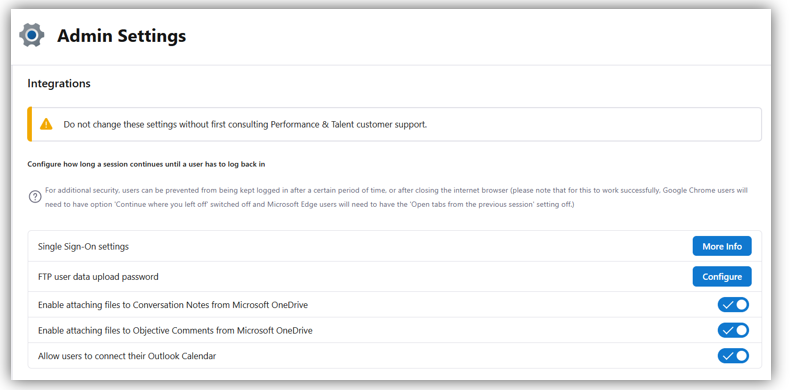
- To enable the outlook integration select ‘Admin settings’ then go to the ‘Integrations’ sector (bottom of the page), and set ‘allow users to connect to their Outlook Calendar’
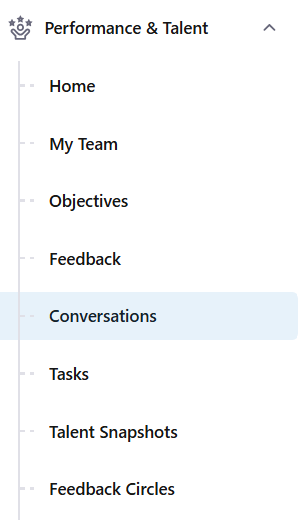
- Select "Conversations"
- For users to connect their calendar to their account, they simply need to select 'Connect' in the Connect your Calendar option

FAQ's
# | Question | Response |
1 | What is the difference between MS365 and MS Exchange? | Office 365 is Microsoft’s go-forward cloud proposition. Exchange is the on-premise legacy variant |
2 | Is it possible to connect calendars for all users centrally? | Not at this current time. Users are required to manually connect their calendar to Performance & Talent. The application will provide relevant help documentation and app cues to guide users through the ‘connection’ process |
3 | What support materials will be provided to Support the Outlook calendar integration? | Administrators: Documentation will be available to guide admin users to toggle the feature and grant ‘calendar permission’ centrally via MS Azure Employees: For users refer to #2 |
4 | My company doesn’t use Outlook, will there be integrations for other email providers? | Not at this current time |
5 | Can Conversations be created from my Outlook calendar and sync with my Performance & Talent Conversations page? | Not at this current time. Conversations will need to be created in Performance & Talent. However, once they have been created they can be edited from Outlook. |
6 | Will recurring conversations sync with my Outlook calendar? | Yes. Recurring events will synchronise with Outlook. NB: Events created pre-connection will not be synchronised. A new recurring event will need to be created. |
7 | Can either party to a scheduled conversation (individual or their line manager) amend the conversation in Outlook? Will these changes sync with the Performance & Talent listing? | Not at this current time. In line with Outlook functionality, meeting invitations can be amended or changed only by the meeting organiser. Participants can respond to meeting and propose changes |
8 | What notification will I receive if a conversation is edited or cancelled in either Outlook or Performance & Talent? | If a Conversation is edited or cancelled in either Outlook or Performance & Talent, an email will be sent to notify all participants or changes. |
9 | Will the prompts for discussion show within the body of the Outlook invite? | Not at this current time. Prompts for discussion will not show within the body of the Outlook invite. However, users will be encouraged to log-in to Performance & Talent to review prompts, add notes and actions |
10 | Will I be able to see the availability of the other party to the conversation if I create the conversation in Performance & Talent? | Yes, if the other party (attendee) has synced their Performance & Talent account with Outlook you will be able to see their availability within the calendar in Performance & Talent. The attendees events will show as Busy, and will be in the colour green |
11 | Will I be able to see the availability of my own calendar when created a conversation? | Yes, if you have enabled the Outlook integration in Performance & Talent, you will automatically see your calendar availability. You will be able to see the titles of your events, and your events will be in the colour blue. |
12 | To view the availability of my attendees’ calendar (when creating conversations), do I, or the attendee need to share my permissions with Outlook? | No, as the creator of the Conversation you will be able to see your own calendar events without enabling any permissions in Outlook. For attendees’ events, there is no requirement for any permissions to be shared in Outlook. The attendees’ events will show as busy. |
13 | How will I know which Calendar event is mine (the creator), and which is the attendees? | Your events will show as blue and show the titles of the event, and the attendees events will show as green, and will just show as busy |
14 | Why can I not view my attendees’ events in the calendar? | If the attendee you are setting up the conversation has not enabled Outlook syncing within Performance & Talent, you will not be able to see their calendar. A notification above the calendar will tell you this, and it will be the attendees’ responsibility to login to their Performance & Talent account to enable Outlook syncing. Or, if they have completed the above, it may be that the attendee has set their calendar sharing permissions in Outlook to ‘None’. |
15 | When trying to view my attendees’ calendar, why do I see ‘Azure subscription for attendee has not user principal name’ | The attendee should disconnect and reconnect their Performance & Talent account with Outlook (in their Account Settings). This should resolve the issue. |
16 | Can I add a virtual meeting link to the invite, e.g., Zoom or Teams, when the conversation is created in Performance & Talent? | Yes, partially. MS Teams is now integrated to Performance & Talent so users can set a ‘Teams Conference’ as the location |
17 | What’s the difference between this integration and the feedback add-in? | The two integrations are independent of one another. The feedback add-in acts as an Outlook plug-in for ‘Feedback’. Whilst the Calendar integration is a 2-way integration (via the MS graph API) to Outlook. |
18 | What versions of Outlook will the calendar integration work with? | This feature support Office 365 only. All other versions of MS Exchange are not currently supported |
19 | Can I add other people to join the conversation from Outlook? | Yes. Additional participants can be added to invitations via Outlook. However, if the additional participant is not an allocated manger in Performance & Talent, they will not have access to the Conversation (included notes and actions) in Performance & Talent |
20 | Who do we contact for support, should we need to? | For support, please raise a support case via the Advanced Customer Portal at https://services.oneadvanced.com/hub |
21 | Will I be able to schedule any conversation type from within Outlook calendar, e.g. Wellbeing, Check-In, Performance Development? | The integration supports all Conversation types. The meeting must be created through Performance & Talent. All changes / updates made via Outlook thereafter will be reflected in Performance & Talent. NB: The conversation name will not be changed in Performance & Talent if it is updated in Outlook |
22 | How often will users need to connect / re-connect to Outlook via Performance & Talent? | Users will be asked to reconnect once ever 9 months. This is similar to how users are asked to re-authenticate to SSO Google or Microsoft accounts every so often. This is done for security reasons and is enforced by Microsoft. This can be pre-empted by users through disconnecting and reconnecting manually. Users will be prompted to reconnect when they have been disconnected. |
23 | If the users password expires / changes will the connection need to be re-authenticated / connected? | Any expiry or changes to password will mean that users would need to be re-authenticated. |
24 | How safe is connecting users calendar within Performance & Talent? | The Performance & Talent application uses Microsoft Graph API to connect to the user’s calendar. Documentation can be here. The integration will not update or change any events that are created by Performance & Talent. |
24 | What data will Performance & Talent be accessing from Outlook? | When a user connects Performance & Talent to Outlook, Performance & Talent has access to the following information in Outlook: · Read permission to access user profile · Read and write permissions to access Calendars |
25 | What happens if the user decides to disconnect their calendar? | Once the user disconnects their Calendar from Performance & Talent. The integration will be disconnected, and events will no longer synchronise between the two applications. |
26 | What happens on deleting events from Outlook that contains ‘notes and actions’ in Performance & Talent? | If an event contains Notes and Actions, and is deleted from Outlook, the event in Performance & Talent will not be deleted to ensure that the data and audit trail of the Conversation is kept. |
28 | What happens if the end date is greater than 2 years? | Events for up to 2 years will be synced in Performance & Talent. Any events later than 2 years will be stored in database but will not be visible in the Performance & Talent user interface |